
CodePush Forks vs Stallion: What Changes Beyond OTA Delivery?
A React Native OTA system can make a JavaScript fix available without waiting for a new native app release.
That part is straightforward.
The interesting part starts when your app is already in production.
How do you test the exact OTA release? How do you control rollout? What happens if a release fails? Who operates the infrastructure? How are updates signed? Where does your OTA data live?
A CodePush fork can give your team control over the OTA stack. Stallion takes a broader approach: a managed React Native OTA platform with enterprise deployment options when your organization needs more infrastructure control.
So the real decision is not: “Can it ship an OTA update?” It is: “How much of the OTA platform do you want your team to build and operate?”
What Is a CodePush Fork?
Microsoft's hosted App Center CodePush service was retired on March 31, 2025.
Teams that still want a CodePush-style workflow can evaluate independently maintained forks and other React Native OTA alternatives.
A fork can be a good fit when your team wants to:
- Self-host the OTA service
- Control the backend and storage
- Modify the implementation
- Deploy inside existing infrastructure
- Own the operational model
But a CodePush fork is not one standardized product. Different forks can provide different capabilities around testing, patching, analytics, rollback, security, deployment, and infrastructure.
That is why the better comparison is not just SDK-to-SDK. It is OTA platform vs OTA platform.
Choose the OTA operating model that fits your team.
How do you want to run your OTA infrastructure?
Choose the model that fits your team's needs.
What's included in this model
- CodePush ForkSelf-hosted OTA stack
- Infrastructure to operateStorage & deliveryMonitoring & maintenanceYour team owns the setup
The First Question: Who Owns Your OTA Infrastructure?
The infrastructure model changes more than where your bundles are stored.
CodePush fork
Self-hosted / open source
Your team typically chooses and operates the surrounding infrastructure. That can mean owning some combination of:
- OTA backend
- Storage
- CDN
- Database / metadata
- Authentication
- Monitoring
- Logging
- Backups
- Scaling
- Security maintenance
The exact requirements depend on the fork.
Stallion
Stallion gives teams more than one deployment model:
Use Stallion Cloud when you want the OTA infrastructure managed for you.
Choose an enterprise deployment model when your organization needs the infrastructure and data inside its own environment.
The point is not that self-hosting is bad. It is that your team gets to choose how much infrastructure ownership it wants.
Beyond “Can It Push JavaScript?”
Once OTA becomes part of a production release process, the workflow becomes:
The strongest OTA platforms help teams manage that entire lifecycle.
Test the Release Before You Roll It Out
One of the biggest advantages of OTA is speed. But speed is only useful if the release can be validated just as quickly.
Traditional JavaScript release testing can involve:
Stallion provides a purpose-built in-app OTA testing workflow. Authorized testers can select a specific compatible OTA version from the app, download it, restart the app, and validate the release on a real device.
That means your QA workflow can test:
- The exact published OTA version
- A specific release candidate
- A compatible release before wider rollout
- Multiple OTA versions without creating another native distribution build
The important difference is not simply “OTA testing.”
Test the exact OTA release on a real device before promoting it to a wider audience.
Learn about React Native OTA testing →
See What Happens After You Publish
Publishing an OTA release is only the beginning. Once users start receiving it, your team needs answers:
- Is the rollout progressing?
- Are downloads succeeding?
- Are installs succeeding?
- Is adoption increasing?
- Are users crashing?
- Has the release been rolled back?
Stallion's release analytics provide visibility into:
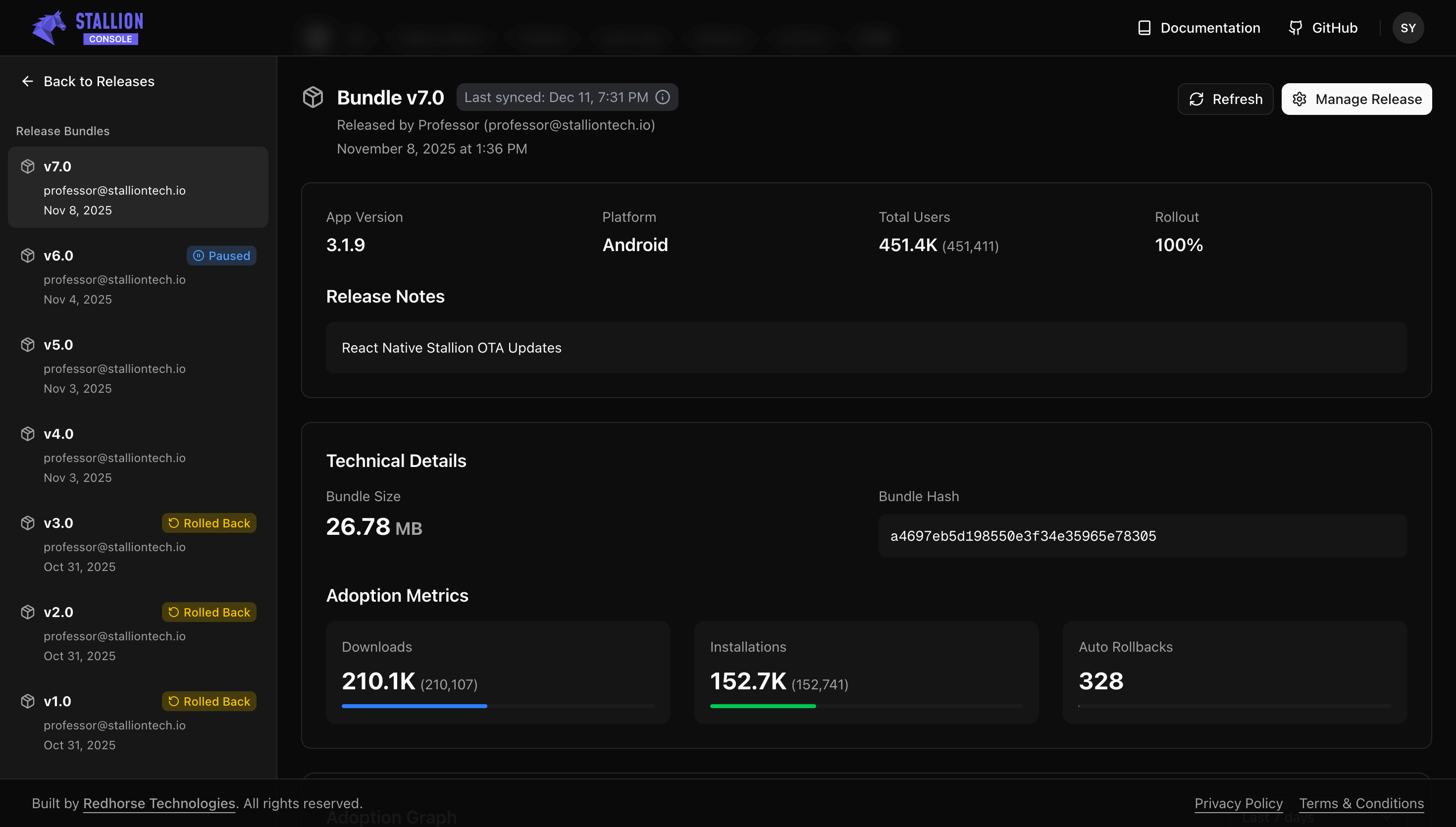
See rollout, downloads, installs, adoption, crash-free rate, and rollback activity from the release dashboard.
From release visibility to release recovery
A production OTA system should not only tell you that something went wrong. It should help you respond.
Stallion provides rollout controls, rollback, automatic recovery, and crash-related release signals as part of the OTA workflow.
Catch problems early, limit exposure, and recover without turning a JavaScript release into a full app-store release cycle.
Differential Updates: Look Beyond “Does It Patch?”
Large OTA artifacts can create unnecessary data transfer when only a small part of an application changes. Modern OTA systems can support differential delivery, so the useful question is not: “Can this OTA platform patch an update?”
Instead ask:
- How are patches generated?
- How efficiently are they generated?
- Which compatible versions can be targeted?
- Is the differential process binary-safe?
- What happens when a patch is unavailable?
- How does patching fit into the wider release workflow?
Stallion supports binary-safe differential patches with on-demand generation between compatible versions. In Stallion's documented benchmark scenarios, Patch Updates have reached up to 98% smaller payloads than corresponding full bundles.
That is a benchmark result, not a promise that every update will be 98% smaller. Actual patch size depends on the changes between releases.
Why patch efficiency matters at scale
For an illustrative 20 MB full artifact and a 400 KB patch:
Actual traffic depends on patch size, adoption, caching, compression, and how many devices can use the patch.
Differential delivery is most valuable when it is part of a complete release system — not a standalone patching mechanism.
Rollouts, Recovery, and Production Control
Not every OTA release needs to reach 100% of users immediately. A safer release strategy can start with a small percentage of the fleet, observe the release, and increase exposure as confidence grows. For example:
Stallion supports gradual rollouts alongside release analytics and recovery controls. This gives teams a production workflow built around:
You are not just publishing a bundle. You are managing a release.
Security: Your OTA Update Is Part of the Software Supply Chain
An OTA bundle is code delivered to production devices. That makes security controls part of the OTA architecture. Teams should ask:
- Who can publish an update?
- How is the bundle signed?
- How does the device verify it?
- Who can manage releases?
- Are release actions auditable?
- Where is OTA data stored?
- Can the deployment meet organizational security requirements?
Stallion supports:
- Customer-managed bundle signing
- On-device verification
- Enterprise SSO
- RBAC
- Audit logs
- Regional data hosting
- Enterprise deployment options
Stallion has also completed a SOC 2 Type I attestation covering Security, Availability, and Confidentiality.
Managed Cloud or Your Infrastructure?
Different organizations have different requirements.
Stallion supports both directions.
Stallion Cloud
Use managed OTA infrastructure without operating the OTA backend yourself.
Regional Hosting
For supported enterprise deployments, keep OTA data within a supported geographic region to help meet data-residency requirements.
Self-Hosted
Run Stallion within your own infrastructure when greater operational control is required.
On-Premise
Deploy Stallion inside your organization's environment for stricter infrastructure and data-sovereignty requirements.
Air-Gapped Deployments
For organizations with highly restricted network environments, applicable air-gapped deployment models are available.
Own the OTA stack because you want to — or let Stallion operate it for you.
What Does Self-Hosted OTA Really Cost?
A CodePush fork can have a low software cost, particularly when the implementation is open source. But the total cost of running an OTA platform is larger than the software itself.
Depending on the implementation, your team may also account for:
Stallion's managed model removes much of that operational work from your team. At some scales, Stallion can be competitive with infrastructure-only costs, before engineering time.
For teams that already have the infrastructure expertise and operational capacity, self-hosting can still be the right choice.
What is the cost of operating OTA, not just the cost of the OTA software?
Explore what matters beyond basic OTA delivery.
Beyond OTA delivery
OTA delivery is only one part of the release workflow. Explore the capabilities teams should evaluate around testing, rollout, security, patching and recovery.
OTA delivery is available depending on the fork and deployment model.
Managed OTA delivery through Stallion Cloud, with enterprise deployment options when organizations need their own environment.
Evaluate the OTA platform, not just the OTA endpoint.
Which Approach Fits Your Team?
A CodePush fork may be the right choice if your team wants to own the OTA stack and has the engineering capacity to operate it.
Stallion may be the better fit if you want the OTA platform managed for you — or need enterprise deployment flexibility without giving up the broader release-management capabilities.
Choose a CodePush fork when you prioritize:
- Open-source ownership
- Infrastructure control
- Customization
- Self-managed operations
Choose Stallion when you prioritize:
- Managed OTA infrastructure
- In-app OTA testing
- Release analytics
- Gradual rollouts and recovery
- Differential patch delivery
- Security and governance
- Regional data hosting
- Self-hosted and on-premise deployment options
- Enterprise support and SLA options
The difference is ultimately operational ownership.
CodePush Fork vs Stallion: The Bottom Line
A CodePush fork can provide a CodePush-style OTA foundation with the flexibility of self-hosting. Stallion builds on the same OTA fundamentals with a broader production workflow:
And you can choose how Stallion is deployed:
So you don't have to choose between “Building the OTA platform yourself” and “Giving up infrastructure control.”
Choose the operating model that fits your organization.
Get Started Free →Frequently Asked Questions
What is a CodePush fork?
A CodePush fork is an independently maintained implementation based on or inspired by Microsoft's CodePush OTA approach. Its features and infrastructure requirements depend on the specific fork.
Is CodePush still available?
Microsoft retired the hosted App Center CodePush service on March 31, 2025. Teams looking for a CodePush-style workflow can evaluate independently maintained forks or other React Native OTA alternatives.
Is Stallion a CodePush alternative?
Yes. Stallion provides React Native OTA delivery with additional capabilities around testing, rollouts, analytics, differential updates, recovery, security, and enterprise deployment.
Are CodePush forks self-hosted?
Many are designed for self-hosting, but the exact infrastructure requirements depend on the fork. Teams should evaluate what they will need to operate, secure, monitor, and scale.
Does Stallion support self-hosted and on-premise OTA?
Yes. Stallion supports self-hosted and on-premise deployment options in addition to Stallion Cloud, subject to the applicable enterprise deployment model.
Does Stallion support differential OTA updates?
Yes. Stallion supports binary-safe differential patches with on-demand generation between compatible versions. Documented benchmark scenarios have reached up to 98% smaller payloads than corresponding full bundles.
Can I test a specific OTA release before rollout?
Yes. Stallion's in-app testing workflow allows authorized testers to select a compatible OTA version, download it, restart the app, and validate the release on a real device before wider rollout.
Does Stallion support rollback and release monitoring?
Yes. Stallion provides gradual rollout controls, release analytics, rollback, automatic recovery, and crash-related release signals.
Does Stallion provide enterprise security controls?
Stallion supports capabilities including customer-managed signing, on-device verification, Enterprise SSO, RBAC, audit logs, regional data hosting, and enterprise deployment options. Stallion has completed a SOC 2 Type I attestation covering Security, Availability, and Confidentiality.
Can I migrate from a CodePush fork to Stallion?
Yes. The migration path depends on your current fork and release setup. Stallion provides migration guidance for teams moving from CodePush-style OTA workflows.
Found this guide useful? Add Stallion Tech to your preferred sources on Google.