
React Native OTA Testing: Ship JavaScript Changes to QA Without a New Build
Updated
A JavaScript change can take five minutes to write and still take much longer to get into the hands of QA.
You change a React Native component. The fix works locally. Now QA needs to test it. So you start another native build. CI runs. The APK or TestFlight build gets distributed. QA installs it. They find another issue. You make another JavaScript change — and the cycle starts again.
The JavaScript change took minutes. Getting it into QA took much longer.
React Native OTA updates can remove the native-build step for compatible JavaScript and other non-native changes. But that creates another question:
How do you get a published OTA release into the hands of internal testers without creating another distribution workflow? That's where OTA testing comes in.
React Native OTA testing is the process of validating OTA-compatible JavaScript changes against an existing native application before those changes are rolled out more broadly.
React Native Stallion includes an in-app OTA testing workflow that lets authorized testers select and validate published OTA releases directly from a compatible React Native application.
Get Started Free →Why React Native QA Gets Stuck
For a JavaScript-only change, traditional mobile QA can involve a surprisingly long path:
The code may be ready in minutes, but QA still has to wait for the native build and distribution process. That creates additional:
- CI build time
- Build queue time
- APK or TestFlight distribution steps
- QA installation steps
- Developer context switching
- Feedback-loop delays
The problem isn't testing.
The problem is rebuilding and redistributing the native application when the change itself doesn't require a new native binary.
Traditional React Native QA
- Code change
- Native build
- CI / distribution
- QA installs
- Test
OTA testing
JS & non-native- Code change
- Publish OTA
- Existing app
- Select release
- Restart
- Test
How to Test React Native OTA Updates With Stallion
Stallion Testing is built around the actual workflow a QA team needs: find the release, download it, restart the application, and validate the change.
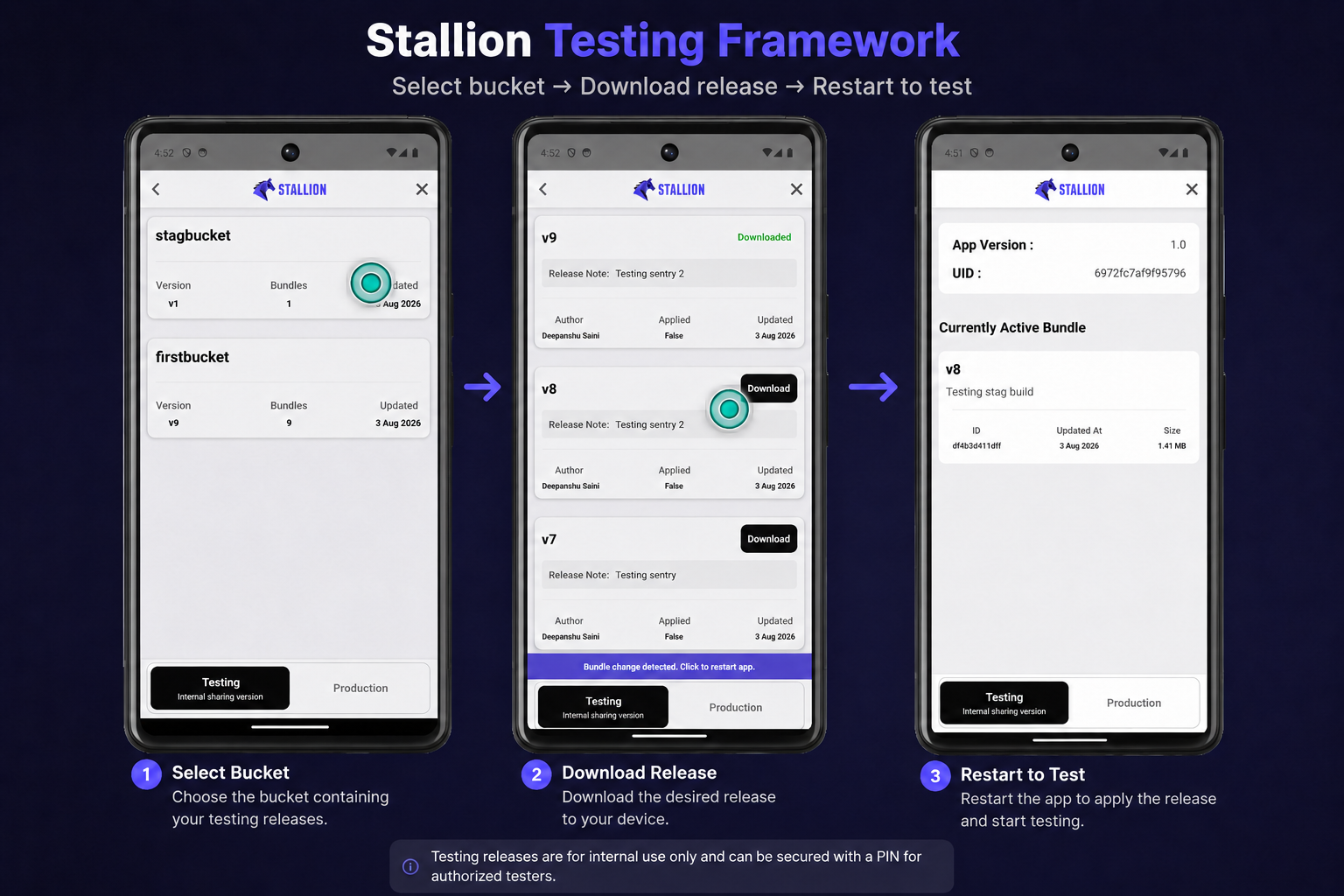
Select the testing bucket
Testers can open the Stallion Testing workflow and select the bucket containing the OTA releases they need to validate.
Select the OTA release
The tester can choose the specific published OTA release they want to validate. This is useful when several releases or candidates are available and QA needs to test a particular version rather than simply receiving the latest production release.
Download and restart
The selected OTA release is downloaded to the application. The app can then be restarted so the new JavaScript is running according to the application's update workflow.
Validate the release
QA tests the release using the existing compatible native application.
If the release fails validation:
If it passes:
This turns OTA testing into a repeatable development-to-QA workflow instead of another manual distribution process.
One Native Build, Multiple OTA Candidates
A useful part of an OTA testing workflow is being able to validate multiple compatible OTA releases using the same native application. For example:
- v1.4.1— Checkout fix
- v1.4.2— Login fix
- v1.4.3— UI fixSelected
- v1.4.4— Payment fix
Imagine QA is validating three JavaScript fixes:
- v1.4.1 — checkout fix
- v1.4.2 — login fix
- v1.4.3 — UI fix
Instead of generating and distributing three new native builds, QA can use the compatible application to select the OTA candidate they need and validate it. This is especially useful when developers are iterating quickly and QA needs to validate specific release candidates.
From QA to Production
Testing is part of the release lifecycle, not a separate workflow.
Once QA approves a release, the same OTA candidate can move through promotion, rollout, monitoring, and recovery.
What OTA Testing Can and Can't Do
OTA testing complements native testing. It doesn't replace it.
Good candidates for OTA testing
OTA testing is useful for compatible JavaScript and non-native changes such as:
- UI changes
- React component changes
- JavaScript logic
- API integration changes
- Validation logic
- Copy changes
- Supported configuration changes
- Feature-flagged functionality
Changes that still require a native build
A new native build is required when a change needs:
- Native code changes
- New native dependencies
- Native module changes
- React Native runtime changes
- Expo SDK or other runtime changes that require a new native binary
- Native permissions
- Native application configuration
- Other changes incompatible with the installed native binary
The key rule is: the OTA release must be compatible with the native application already installed on the device.
This makes OTA testing a complement to native testing, not a replacement for the mobile testing strategy.
Why Test the Published OTA Release?
Local development tells you that the JavaScript works.
OTA testing validates the release that QA is actually going to receive:
- The published bundle
- The installed native runtime
- OTA compatibility
- Update installation
- Restart behavior
- Release configuration
The important question becomes:
"Does this published OTA release work correctly with the native application our users already have?"
That is different from simply asking whether the code works locally.
Smaller OTA Payloads Can Make Testing Faster
Testing speed isn't only determined by the release workflow. It can also depend on how much data the tester needs to download.
For applications with larger JavaScript bundles, differential patch delivery can reduce the amount of data transferred when a compatible patch is available. A small JavaScript change may therefore be represented by a substantially smaller patch than the corresponding full bundle.
Stallion's Patch Updates support on-demand differential patch generation between compatible OTA versions. When a smaller patch can represent the change, testers can download less data before validating the release. Actual patch sizes depend on what changed between releases. Learn about React Native Patch Updates →
This creates another useful optimization:
React Native OTA Testing With CI/CD
OTA testing becomes even more useful when bundle publishing is automated. A typical workflow can look like:
Instead of manually uploading a bundle after every change, your CI pipeline can publish the candidate OTA release and leave QA with a controlled way to validate it. Stallion supports CI/CD workflows through its CLI and CI tokens.
Learn about React Native OTA CI/CD integration →Why Stallion Testing?
OTA delivery gets the update onto a device.
Testing determines whether your team can confidently ship it.
Stallion Testing brings the OTA release and internal QA workflow together:
- Select the release — testers can choose the specific OTA candidate they need to validate.
- Test inside the existing app — compatible OTA releases can be tested without creating a new native distribution package for every JavaScript iteration.
- Keep internal releases controlled — use an internal testing workflow and security controls.
- Move from QA to rollout — connect validation with release promotion and production delivery.
- Combine testing with patch-first OTA — reduce the amount of data transferred when a differential patch is available.
- Fit testing into CI/CD — automate OTA publishing while keeping QA validation as a deliberate release step.
The workflow becomes:
That's the real value of OTA testing: not removing QA, but removing unnecessary build and distribution work from the QA loop.
Build Faster Feedback Loops, Not Just Faster Apps
React Native development isn't only about how quickly developers can write code. It's also about how quickly QA can validate those changes.
For compatible JavaScript changes, OTA delivery can remove the need for a new native build between a code change and QA. Stallion Testing gives authorized testers a controlled way to select, download, and validate published OTA releases directly from the existing application.
A JavaScript change shouldn't require a new native build just to reach QA.
Related Resources
Frequently Asked Questions
What is React Native OTA testing?
React Native OTA testing is the process of validating OTA-compatible JavaScript and other non-native changes against an existing compatible native application before broader rollout.
How do I test React Native OTA updates?
A typical workflow is to publish an OTA release, make it available to authorized testers, select the release from the application, download it, restart the application when required, and validate the change. Stallion provides an in-app testing workflow for this process.
Can I test OTA updates without rebuilding the React Native app?
For compatible JavaScript and non-native changes, yes. An existing compatible native application can receive and test the OTA release. Changes that require native code, native dependencies, runtime changes, permissions, or other incompatible native capabilities still require a new native build.
Does OTA testing replace native testing?
No. OTA testing complements native testing. Native builds are still required for native changes and should continue to be used for full application and store-release validation.
How quickly can QA test a Stallion OTA release?
Stallion's documented testing workflow is designed to get a published OTA release into testing in under 60 seconds. Actual time depends on factors such as bundle size, network conditions, device performance, and the testing environment.
Can multiple OTA releases be tested?
Yes. Stallion Testing is designed to let authorized testers select from available OTA releases and validate different candidates using a compatible native application.
Can I restrict OTA testing to internal users?
Yes. Stallion supports controlled testing access, including a security PIN and the ability to keep the testing entry point behind an internal or feature-flagged workflow.
Can I use Stallion Testing with CI/CD?
Yes. Stallion can be integrated into CI/CD workflows so that publishing an OTA bundle can become part of an automated release pipeline. QA can then validate the published release before promotion.
Can I test an Expo React Native application with Stallion?
Yes. Teams using Expo can continue using Expo for development and native builds while using Stallion for OTA delivery and testing, provided the native application is configured for Stallion and the OTA update is compatible with that native build. Learn about Expo integration with Stallion.
Ready to Shorten Your React Native QA Loop?
Give QA a faster way to validate OTA releases. Let authorized testers select, download, and validate published OTA releases directly inside your React Native app.
Found this guide useful? Add Stallion Tech to your preferred sources on Google.